 Why always me?
Here’s the more fully fleshed out http_server.ex file.
defmodule Servy.HttpServer do

  @doc """
  Starts the server on the given `port` of localhost.
  """
  def start(port) when is_integer(port) and port > 1023 do

    # Creates a socket to listen for client connections.
    # `listen_socket` is bound to the listening socket.
    {:ok, listen_socket} =
      :gen_tcp.listen(port, [:binary, packet: :raw, active: false, reuseaddr: true])

    # Socket options (don't worry about these details):
    # `:binary` - open the socket in "binary" mode and deliver data as binaries
    # `packet: :raw` - deliver the entire binary without doing any packet handling
    # `active: false` - receive data when we're ready by calling `:gen_tcp.recv/2`
    # `reuseaddr: true` - allows reusing the address if the listener crashes

    IO.puts "\n🎧  Listening for connection requests on port #{port}...\n"

    accept_loop(listen_socket)
  end

  @doc """
  Accepts client connections on the `listen_socket`.
  """
  def accept_loop(listen_socket) do
    IO.puts "⌛️  Waiting to accept a client connection...\n"

    # Suspends (blocks) and waits for a client connection. When a connection
    # is accepted, `client_socket` is bound to a new client socket.
    {:ok, client_socket} = :gen_tcp.accept(listen_socket)

    IO.puts "⚡️  Connection accepted!\n"

    # Receives the request and sends a response over the client socket.
    serve(client_socket)

    # Loop back to wait and accept the next connection.
    accept_loop(listen_socket)
  end

  @doc """
  Receives the request on the `client_socket` and
  sends a response back over the same socket.
  """
  def serve(client_socket) do
    client_socket
    |> read_request
    |> generate_response
    |> write_response(client_socket)
  end

  @doc """
  Receives a request on the `client_socket`.
  """
  def read_request(client_socket) do
    {:ok, request} = :gen_tcp.recv(client_socket, 0) # all available bytes

    IO.puts "➡️  Received request:\n"
    IO.puts request

    request
  end

  @doc """
  Returns a generic HTTP response.
  """
  def generate_response(_request) do
    """
    HTTP/1.1 200 OK\r
    Content-Type: text/plain\r
    Content-Length: 6\r
    \r
    Hello!
    """
  end

  @doc """
  Sends the `response` over the `client_socket`.
  """
  def write_response(response, client_socket) do
    :ok = :gen_tcp.send(client_socket, response)

    IO.puts "⬅️  Sent response:\n"
    IO.puts response

    # Closes the client socket, ending the connection.
    # Does not close the listen socket!
    :gen_tcp.close(client_socket)
  end

end
Web Server Sockets
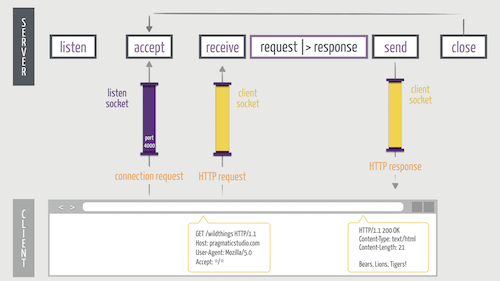
Socket Timeline Diagram
For a quick recap, here’s a diagram of the timeline of sockets as seen in the video:
Erlang |> Elixir
Here’s a summary of things to keep in mind when transcoding Erlang to Elixir:
-
Erlang atoms start with a lowercase letter, whereas Elixir atoms start with a colon (:). For example, ok in Erlang becomes :ok in Elixir.
-
Erlang variables start with an uppercase letter, whereas Elixir variables start with a lowercase letter. For example, Socket in Erlang becomes socket in Elixir.
-
Erlang modules are always referenced as atoms. For example, gen_tcp in Erlang becomes :gen_tcp in Elixir.
-
Function calls in Erlang use a colon (:) whereas function calls in Elixir always us a dot (.). For example, gen_tcp:listen in Erlang becomes :gen_tcp.listen in Elixir. (Replace the colon with a dot.)
-
Last, but by no means least, it’s important to note that Erlang strings aren’t the same as Elixir strings. In Erlang, a double-quoted string is a list of characters whereas in Elixir a double-quoted string is a sequence of bytes (a binary). Thus, double-quoted Erlang and Elixir strings aren’t compatible. So if an Erlang function takes a string argument, you can’t pass it an Elixir string. Instead, Elixir has a character list which you can create using single-quotes rather than double-quotes. For example, ‘hello’ is a list of characters that’s compatible with the Erlang string “hello”.
Running the Server from the Command Line
In the video we started the server in an iex session. You can also start it from the command line using
mix run -e "Servy.HttpServer.start(4000)"
This runs the given Elixir expression in the context of the application. It also recompiles any files that are out of date.
Sending POST Requests from the Command Line
In the video we used the Unix curl command-line utility to send a request, just to demonstrate that any HTTP client can talk to our server:
curl http://localhost:4000/api/bears
In a previous exercise we challenged you to handle a POST request to the API endpoint /api/bears with a Content-Type of application/json. Here’s how to use the curl utility to send a request to that endpoint:
curl -H 'Content-Type: application/json' -XPOST http://localhost:4000/api/bears -d '{"name": "Breezly", "type": "Polar"}'
The -H option is used to set the Content-Type header to application/json. The -X option sets the request method to POST. And the -d option sets the request body to the given JSON string representing the bear you want to create.
Exercise: Watch a Throwback Video
While we’re on the topic of Erlang’s history, every self-respecting Elixir developer should watch Erlang: The Movie at least once. It’s intended to be serious but, not unlike your favorite 80’s movie, it comes off as a tad humorous in retrospect. Good times!
Exercise: Write an HTTP Client
In the video we converted (transcoded) the server example from the gen_tcp documentation and used a browser as the HTTP client.
The gen_tcp module can also be used to write a client that talks to a TCP server. If you want some extra practice transcoding from Erlang to Elixir, convert the following client example (copied from the documentation) to Elixir:
client() ->
    SomeHostInNet = "localhost", % to make it runnable on one machine
    {ok, Sock} = gen_tcp:connect(SomeHostInNet, 5678,
                                 [binary, {packet, 0}]),
    ok = gen_tcp:send(Sock, "Some Data"),
    ok = gen_tcp:close(Sock).
One gotcha is that the connect function expects the first argument to be an Erlang string (the host name). The example uses the double-quoted string “localhost”. In Erlang, a double-quoted string is a list of characters whereas in Elixir a double-quoted string is a sequence of bytes (a binary). So if you pass the double-quoted Elixir string “localhost” into the Erlang connect function, it won’t work. So how do we get a list of characters in Elixir? Easy, just use single-quotes rather than double-quotes. For example, pass ‘localhost’ rather than “localhost”.
To connect it to your web server, you’ll need to make the following changes:
- Use the following options:
[:binary, packet: :raw, active: false]- Send a valid HTTP request, such as the following:
request = """
GET /bears HTTP/1.1\r
Host: example.com\r
User-Agent: ExampleBrowser/1.0\r
Accept: */*\r
\r
"""
After sending the request, receive the response back from the server and print it out.
Code So Far
The code for this section is in the sockets directory found within the video-code directory of the code bundle